Smart Energy Monitors UK: Do They Actually Save You Money?
UK energy bills have been a fixture of the national conversation for the past few years, and with good reason. […]
Contents
- Two Types of Smart Energy Monitor
- 1. Smart Meter Displays (IHDs and CADs)
- 2. Whole-Home Clamp Meters
- Getting Clamp Meter Installation Right
- Best Clamp Meter: Shelly EM Gen3
- Best Compact Option: Shelly EM Mini Gen4
- Budget Monitoring: TP-Link Tapo P110 Smart Plug
- What About the Hildebrand Glow?
- How Much Can a Smart Energy Monitor Save?
- Who Doesn’t Need One
- What to Look For
- What happens if I clamp the wrong cable?
- Do I need an electrician, or can I fit this myself?
- Related Guides
- Frequently Asked Questions
- Do I need a smart meter for an energy monitor?
- Is the Shelly EM safe to install yourself?
- Can I monitor solar panels with these?
- Will an energy monitor work with Octopus Agile or Flux?
UK energy bills have been a fixture of the national conversation for the past few years, and with good reason. The average household now spends well over £1,500 a year on gas and electricity. The problem is that most of us have very little visibility into where that money actually goes - which appliances are the worst offenders, when our usage peaks, and whether our smart thermostat is actually making a dent. A smart energy monitor changes that.
The good news is that the UK is well-placed to take advantage of energy monitoring technology. Smart meters are now in the majority of homes, and the ecosystem of compatible monitors and displays has matured significantly. This guide explains the two main types of smart energy monitor, recommends the best options currently available, and helps you decide which approach suits your home.
Two Types of Smart Energy Monitor
Before buying, it’s worth understanding that smart energy monitors broadly fall into two categories - each with different installation requirements and different types of data.
1. Smart Meter Displays (IHDs and CADs)
If you have a SMETS2 smart meter (the second-generation smart meters installed by most energy suppliers since 2018), you can use a Consumer Access Device (CAD) or an upgraded In-Home Display (IHD) to pull real-time energy data from the national smart meter network. The Hildebrand Glow is the best-known example - it shows your current usage in pence per hour, connects to the DCC (the national smart meter data network), and feeds data into a smartphone app. It’s available direct from glowmarkt.com rather than Amazon. No wiring is required - it communicates wirelessly with your smart meter. The limitation is that you can only see whole-home usage, not individual circuits or appliances.
2. Whole-Home Clamp Meters
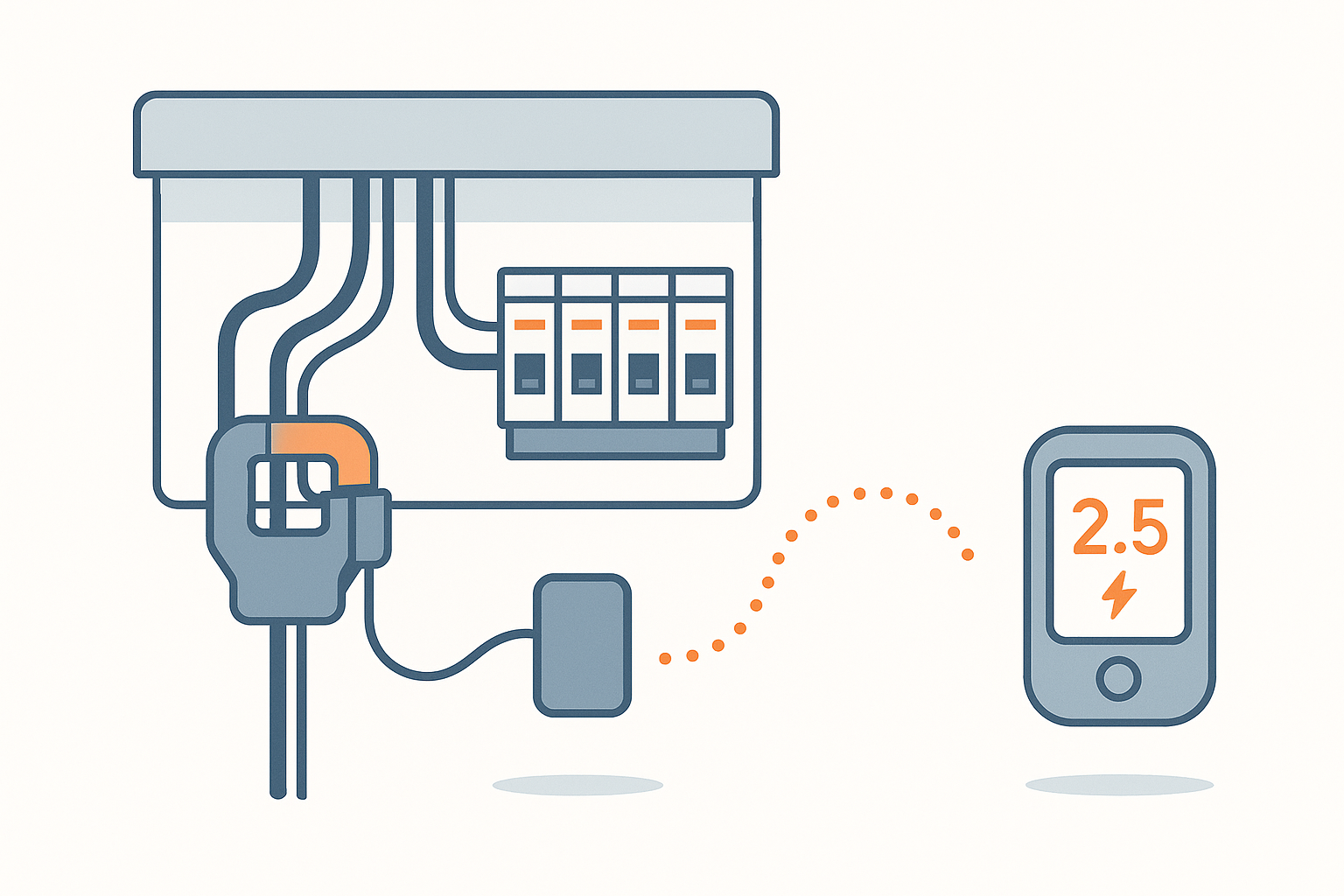
Clamp meters work on a completely different principle. They use a CT (current transformer) clamp that snaps around your incoming mains cable in the consumer unit (fuse box) and measures the current flowing through it. This works with any type of meter - smart or traditional - and gives you real-time whole-home energy data via a Wi-Fi connected device. Some models support two CT clamps, letting you measure solar generation separately from grid import. Installation requires a brief visit to the consumer unit: no wires are cut or connected - the clamp simply wraps around the cable - but you should be comfortable opening the fuse box, or ask a qualified electrician to do it.
Getting Clamp Meter Installation Right
The one detail that trips up a fair number of first-time installs: a CT clamp needs to go around a single conductor - the incoming live (or, for solar, the single cable to the inverter) - not around both the live and neutral together, which cancels the magnetic field the clamp is actually measuring and gives a reading of zero or near-zero. UK consumer units almost always have the incoming live and neutral as two separate cables entering the meter tails, so this is usually straightforward to get right, but it’s the single most common reason someone installs a Shelly EM and sees no reading at all. Also worth knowing: virtually all UK domestic properties are single-phase (unlike some larger European installations), so a standard single or dual-clamp device covers a normal home fully - three-phase supplies exist but are rare outside larger properties or ones with a dedicated workshop/outbuilding drawing serious power.
Best Clamp Meter: Shelly EM Gen3
The Shelly EM Gen3 is the standout choice for whole-home energy monitoring. It’s a Wi-Fi connected device that fits inside a standard DIN rail enclosure or can be surface mounted near your consumer unit. It supports two CT clamps - useful if you want to monitor both your grid import and solar generation simultaneously. Data is displayed in the Shelly app in real time, and the device stores up to 10 days of one-minute interval data locally, so you don’t lose history if your internet goes down.
Critically, the Shelly EM Gen3 integrates natively with Home Assistant, meaning you can combine energy data with your other smart home automations - for example, automatically turning on your dishwasher when solar generation is high. It also works with Alexa and Google Home. At around £35-£50, it’s exceptional value. The only requirement is a brief visit to your consumer unit to attach the CT clamp around the incoming mains cable.
Best Compact Option: Shelly EM Mini Gen4
The Shelly EM Mini Gen4 is a smaller, more affordable version suited to monitoring individual circuits rather than whole-home consumption. It’s Matter-certified, meaning it’ll integrate with Apple HomeKit, Google Home, and Amazon Alexa without any special setup, and it fits into tighter spaces. With a single channel rated up to 16A, it’s ideal for monitoring the circuit feeding your home office, electric vehicle charger, or immersion heater - rather than your entire home. Good value at around £20-£25.
Budget Monitoring: TP-Link Tapo P110 Smart Plug
If you don’t want to touch your consumer unit at all and just want to understand what specific appliances are costing you, the TP-Link Tapo P110 energy monitoring smart plug is the simplest option. Plug it into any socket, connect your appliance, and the Tapo app shows real-time wattage and monthly kWh consumption. Ideal for understanding the running cost of your fridge, washing machine, tumble dryer, or gaming PC. It’s not whole-home monitoring, but it’s remarkably useful for identifying your biggest energy consumers - and the Tapo P110 is a genuinely excellent smart plug in its own right.
What About the Hildebrand Glow?
The Hildebrand Glow remains the best option for SMETS2 smart meter owners who want a display without any installation work. It connects to the DCC and shows your real-time gas and electricity usage in pence and kilowatt-hours. For Octopus Energy customers, it unlocks access to half-hourly consumption data directly in the Octopus app, which is particularly useful for Agile tariff customers who want to shift usage to cheaper periods. The Glow is available directly from glowmarkt.com - it’s not currently available on Amazon UK.
How Much Can a Smart Energy Monitor Save?
Studies consistently suggest that households with real-time energy visibility reduce their consumption by 5-15% simply through awareness - you start turning things off that you didn’t know were drawing power. The savings compound significantly when you combine a monitor with a smart thermostat and smart radiator valves (TRVs): the monitor shows you what heating is costing, the thermostat and TRVs let you act on that information precisely. For a typical UK home, the payback period on a Shelly EM Gen3 is measured in weeks.
Who Doesn’t Need One
If you’re already on a fixed-rate tariff with no time-of-use pricing, don’t have solar or an EV to optimise around, and your current bills aren’t a source of surprise, the awareness benefit of a monitor is smaller than for someone on Agile/Flux-style variable pricing or someone genuinely unsure where their consumption goes. It’s also not going to meaningfully help if the real issue is your home’s insulation or an inefficient boiler - a monitor tells you what’s costing money, it doesn’t fix the underlying inefficiency itself.
What to Look For
- Smart meter compatibility: IHD/CAD devices need a SMETS2 smart meter. Clamp meters work with anything.
- Whole-home vs appliance-level: Decide whether you want to see total consumption or drill down into individual devices.
- App quality: Shelly’s app is good; the Hildebrand Glow app is excellent for smart meter data.
- Home Assistant integration: If you run Home Assistant, the Shelly EM is the natural choice - deep integration out of the box.
- Solar monitoring: The Shelly EM Gen3 supports two CT clamps for import/export measurement.
- Price: The Shelly EM Gen3 at ~£40 is outstanding value for whole-home monitoring.
What happens if I clamp the wrong cable?
Clamping both live and neutral together, rather than just the single live conductor, cancels out the magnetic field the clamp reads and gives a zero or near-zero reading - this is the most common installation mistake and is easy to fix by re-checking which individual cable you’ve clamped. It’s not a safety issue, just a measurement one.
Do I need an electrician, or can I fit this myself?
Clamping the CT sensor itself involves no cutting or connecting of live wires - the clamp opens and closes around the outside of an existing cable. Many confident DIYers fit these themselves in a few minutes. That said, you are working inside an open consumer unit with live parts nearby, so if you’re at all unsure, it’s a quick, inexpensive job for a qualified electrician rather than something to guess at.
Related Guides
- Best Smart Thermostat UK 2026
- How to Cut Energy Bills with a Smart Home
- Best Smart Radiator Valves UK 2026
- Best Smart Plugs UK 2026
Frequently Asked Questions
Do I need a smart meter for an energy monitor?
No. Clamp meters like the Shelly EM Gen3 work with any meter - smart or traditional - because they measure current directly at the consumer unit. Smart meter displays (IHDs and CADs like the Hildebrand Glow) do require a SMETS2 smart meter to connect to the national data network.
Is the Shelly EM safe to install yourself?
The CT clamps clip around the outside of cables - you don’t need to cut or connect any wires. However, you do need to open the consumer unit cover to reach the incoming mains cable, and the consumer unit may contain live parts. If you’re comfortable and confident, it’s a straightforward job. If not, a qualified electrician can fit it in under an hour.
Can I monitor solar panels with these?
Yes - the Shelly EM Gen3 supports two CT clamps, allowing you to measure both what you import from the grid and what your solar panels generate (or export). This gives you a complete picture of your home’s energy flows and helps you shift usage to periods when your solar generation is highest.
Will an energy monitor work with Octopus Agile or Flux?
Yes, and it’s particularly powerful. Pairing a Shelly EM with Home Assistant lets you see your real-time energy cost calculated at the current Agile rate, and you can set automations to run appliances only when the rate drops below a threshold you set. For Octopus customers, the Hildebrand Glow also unlocks detailed consumption data directly in the Octopus app.
Related guides
 GUIDE
GUIDE
Smart Home Gear That Actually Works in a Small Flat or Shared House (UK)
What to buy for communal areas vs your own room in a house share, and how…
 GUIDE
GUIDE
Smart TVs and Streaming Boxes for a Connected Home: UK Picks
Apple TV, Fire TV Stick and Chromecast compared for how well each plugs into your existing…
 GUIDE
GUIDE
Smart Dehumidifiers UK: Which Ones Are Actually Worth Automating
Meaco, Pro Breeze and EcoAir smart dehumidifiers compared for tackling UK damp and condensation, plus a…